MVP Thin Slice Method - Scope Down to Ship Fast
Learn the thin slice MVP method: scope the minimal viable product to one user flow, one metric, one payment. I show you how in 14 days.
Ship the Thin Slice: How to Scope a 14‑Day MVP That Actually Moves the Needle
A 14‑day MVP isn’t magic; it’s constraint. The trick is to ship a thin slice - the minimal vertical cut that proves value end‑to‑end: auth → one core flow (happy path) → payments/analytics → deploy. This post shows exactly how I scope that slice so it’s shippable in two weeks and useful on Day 14.
TL;DR
- Decide one user, one job‑to‑be‑done, one success metric for 30 days.
- Map the happy path (one way to win). Edge cases → Backlog.
- Choose defaults (hosted DB, proven libs, minimal settings).
- Define acceptance criteria for each step; timebox unknowns.
- Build auth → core flow → payments/analytics → deploy + docs.
- Demo on Day 14; queue Sprint 2 with prioritized backlog.
1) One user • One job • One metric
User (who)
Pick a single primary persona who gets immediate value (e.g., “Property manager at small portfolio”).
Job (what)
Write a one‑sentence JTBD: “When [situation], the user [does] to get [outcome].”
Metric (proof)
Define success you can observe within 30 days (sign‑ups, completed flows, paid transactions, scheduled demos).
Example: “10 qualified sign‑ups, 7 completed core flows, 2 paid transactions.”
2) Map the happy path (one way to win)
Write 5–7 steps from “first contact” to “moment of value” (the point where the user would say “this helps”). Ignore fail states for now.
Visit → Sign up → Create [thing] → Review → Pay/Confirm → See result
Keep it linear. If a step branches, pick the most common branch.
3) Define the “moment of value”
Ask: What screen or event proves the core job happened?
- Marketplace: checkout success (order created)
- AI tool: output preview saved/shared
- SaaS tool: entity created and visible to another user
- E‑commerce add‑on: payment confirmed and basic analytics recorded
Your MVP should race to this moment with the fewest possible screens.
4) Choose defaults (kill the debates)
Defaults that keep 14 days realistic:
- Infra/DB: hosted Postgres (or your hosted DB of choice) + migrations.
- Auth: Email/OAuth with sessions; roles only if strictly required.
- Payments: Stripe (or platform default) early (test → live).
- Analytics: 5–8 product events that map your happy path.
- UI: a11y‑friendly component library; minimal settings.
If a decision takes >30 minutes, pick a reversible default and move.
5) Thin‑slice deliverables (the 14‑day package)
- Auth - sign up/in, stay signed in, sign out; basic authorization guard.
- Core flow - one happy path from create → confirm.
- Payments/analytics - take money (if relevant), record events.
- Integrations (if required) - exactly what the happy path needs.
- Deploy + docs - prod URL, README, system sketch, ops notes.
- Backlog - all the “great ideas” parked for Sprint 2.
The 14‑day build timeline (at a glance)
Here is how the thin slice maps to two working weeks. This is the exact cadence I run on a 14‑day MVP sprint:
| Day | Phase | What ships | Demo‑able checkpoint |
|---|---|---|---|
| 1 | Decide | Scope Card signed: one user, one job, one metric | Happy‑path diagram + backlog |
| 2–3 | Foundation | Repo, CI, envs, DB + migrations, auth | Sign up / sign in behind a guard |
| 3–7 | Core flow | The single happy path, create → confirm | 90‑second Loom of end‑to‑end flow |
| 8–10 | Money + measurement | Stripe (test → live), 5–8 product events | Mini funnel dashboard |
| 10–12 | Hardening | Validation, empty states, access control, indexes | Lighthouse pass on core pages |
| 13 | Docs + deploy | README, system sketch, production URL | Fresh‑laptop run test |
| 14 | Demo + handoff | Live demo, recorded walkthrough, repo handoff | Sprint 2 backlog prioritized |
If a task does not fit a cell in this table, it is Sprint 2 work. The grid is the constraint.
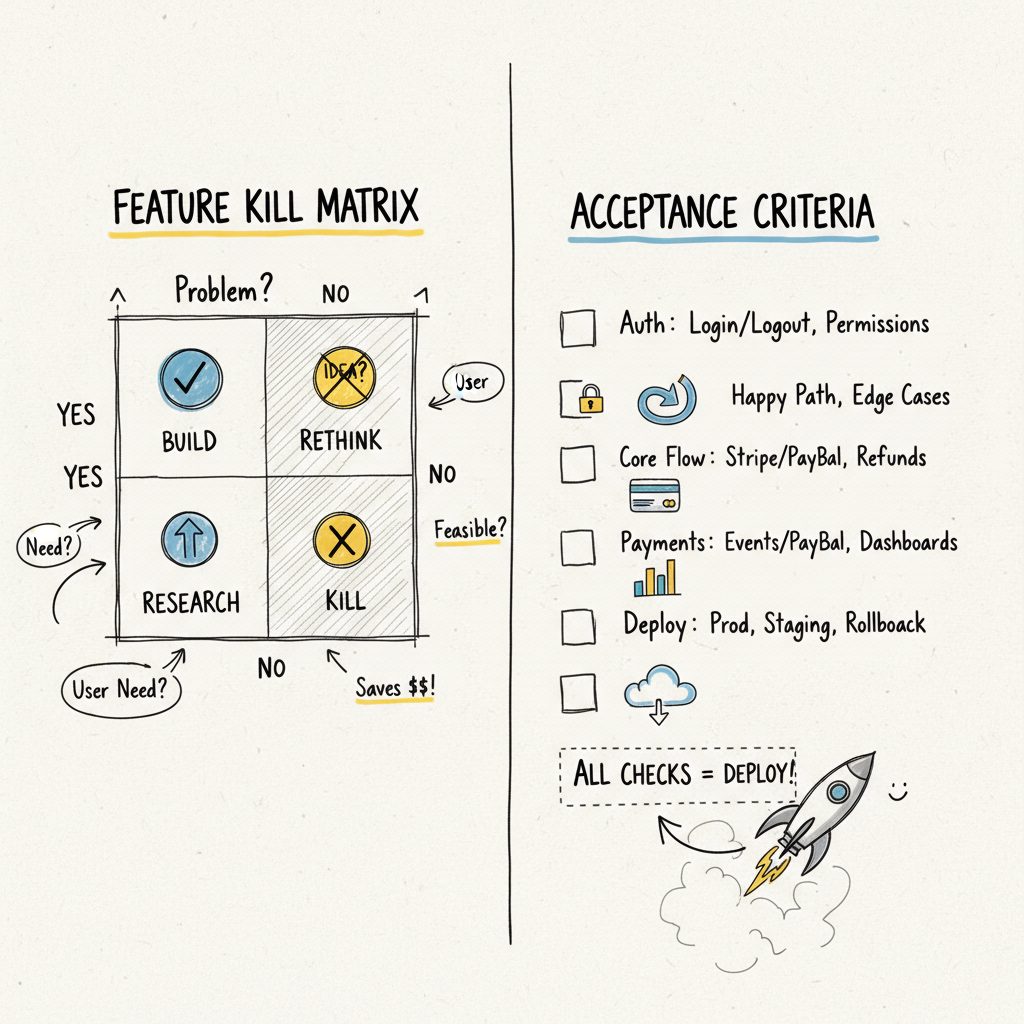
6) Acceptance criteria (so “done” is done)
For each step, define a check you can demo.
Auth ACs
- User can sign up/in; session persists across refresh.
- Protected routes redirect unauthenticated users.
Core flow ACs (example: marketplace)
- Create listing with title/price/media; appears in list and detail.
- Add to cart → checkout → order record exists with status=paid.
Payments ACs
- Test card succeeds; order status updates; receipt/log created.
Analytics ACs
- Events exist for view → start → complete; simple query shows conversion.
Deploy/docs ACs
- New developer can run the project with README alone (fresh‑laptop test).
7) Put everything else in Sprint 2
Common backlog items:
- Notifications matrix and templates
- Fine‑grained roles/permissions
- Settings, theming, imports/exports
- Advanced reporting
- Edge‑case flows
Backlog isn’t a graveyard - it’s how you protect speed without losing ideas.
8) Thin‑slice templates by product type
A) B2B SaaS
- Happy path: Invite → Create entity → Share/Use → (Pay if needed)
- Deliverables: Auth, entities (create/view), sharing (basic), analytics, optional Stripe
- Moment of value: Entity viewed/used by another real user
- Example: Auth → Create Project → Add Item → Share Link → See Activity
B) Marketplace
- Happy path: List item → Discover → Checkout
- Deliverables: Create/list/listing detail, cart/checkout, order record, analytics
- Moment of value: Successful checkout
- Example: Create Listing → Listing Detail → Add to Cart → Pay → Order Record
C) AI Wrapper
- Happy path: Input → Model call → Review → Save/Export → (Paywall optional)
- Deliverables: Prompt/input UI, async job or streaming, output preview, save/export, basic credit or paywall
- Moment of value: Saved/exported output that user can use/share
- Example: Auth → Input → Generate → Preview → Save/Export → (Pay)
D) E‑commerce Add‑On
- Happy path: Product page → Add to cart → Pay → Confirmation
- Deliverables: PDP, cart/checkout, order capture, analytics, simple admin seed
- Moment of value: Payment captured + confirmation page
- Example: PDP → Cart → Checkout → Payment Success → Order Record
9) The Feature Kill Matrix (use this to say “not now”)
Include now only if the answer to both is “yes”:
- Does it directly enable the moment of value?
- Will it be demonstrated in the Day‑14 demo?
If not, backlog it. Example: “bulk import” rarely enables a Day‑14 demo.
10) Example thin‑slice spec (copy/paste)
Goal: 10 buyers complete checkout in 30 days.
Deliverables (Sprint 1):
- Auth (email/OAuth), create listing (title, price, media)
- Listing list/detail, add to cart, checkout (Stripe)
- Events: listing_viewed, checkout_started, order_paid
- Deploy, README, ops runbook
Backlog (Sprint 2): notifications, admin analytics, CSV import, theming
Risks: media upload perf → compress client‑side; price edits → lock price at checkout
11) Demo script (5 minutes)
- Create account → sign in
- Create listing “X” ($Y) with one image
- Open listing detail → add to cart → pay (test card)
- Show order record + confirmation
- Open analytics page (3 events visible)
- Show docs/README → show production URL
If you can’t demo it in five minutes, the slice is too wide.
12) Definition of Done (DoD)
- User can complete the core job without help (happy path).
- Payments (if relevant) work; an order/record exists.
- Analytics show start → complete counts.
- Docs exist; deploy is live; you own repo + infra.
- Backlog is prioritized (Sprint 2 plan ready).
13) Common pitfalls (and fixes)
- “Let’s add roles, notifications, settings first.” → No. Ship the job, not the knobs.
- “We need perfect design before build.” → No. Use accessible defaults; refine post‑demo.
- “Edge cases keep breaking the timeline.” → Happy path only in Sprint 1; document edges.
14) What this looks like with me (Week One Labs)
- Day 1: lock user/job/metric, map happy path, sign a one‑page Scope Card.
- Days 2–13: auth → core flow → payments/analytics → integrations (if needed).
- Day 14: demo + deploy + docs. You own repo and infra.
Price: Intro sprint $3,999 (fixed fee; 2–3 core features). If I miss agreed scope due to me, I add a free week.
15) A real thin slice in the wild (PropOps)
This is not theory. A first‑time founder brought me a one‑page Notion doc for a property‑management tool. The thin slice we shipped was: auth → submit request → assign → resolve → invoice (Stripe) → basic funnel analytics. Everything else (roles, notifications, exports, theming) went to the backlog.
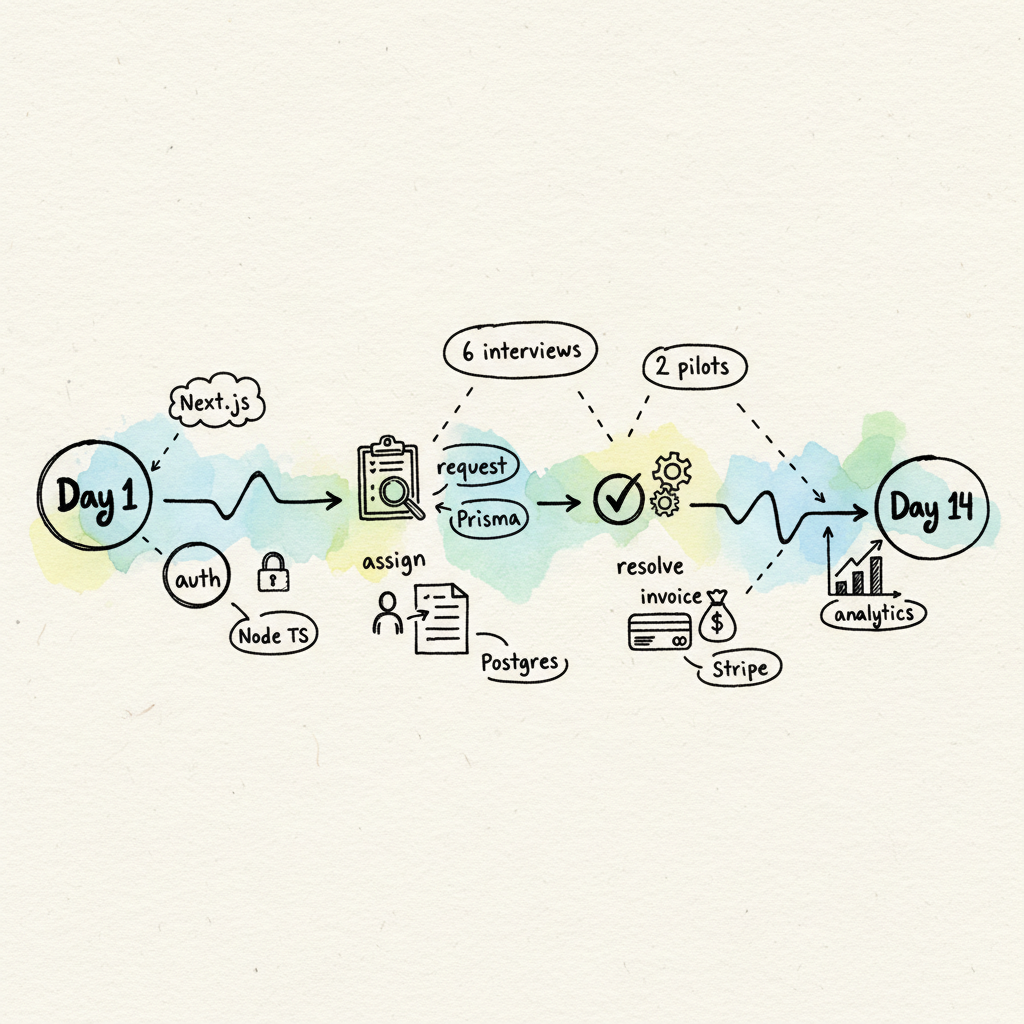
The numbers from that 14‑day build:
| Metric | Result |
|---|---|
| Time from Notion doc to live demo | 14 working days |
| Features shipped in Sprint 1 | 1 core flow + payments + analytics |
| Customer interviews the demo powered | 6 |
| Pilots confirmed within 2 weeks | 2 |
| Spreadsheet replaced by | Week 1 |
The point of a thin slice is exactly this: a believable, repeatable demo that starts real conversations. Read the full breakdown in the PropOps thin‑slice case study, or see how a SaaS MVP build follows the same cadence.
Frequently Asked Questions
What exactly is a thin slice MVP?
A thin slice is the minimal vertical cut of your product that proves value end to end: authentication, one core happy‑path flow, payments or analytics, and a live deploy. It is not a stripped‑down version of every feature; it is one complete feature path that a real user can finish without help.
Can you really build an MVP in 14 days?
Yes, when scope is held to a single happy path. The 14‑day timeline works because edge cases, extra roles, settings, and integrations are pushed to Sprint 2. The constraint is what makes the date real. If a feature does not appear in the Day‑14 demo, it does not ship in Sprint 1. Week One Labs ships these on a fixed‑price 14‑day MVP sprint.
How much does a 14‑day MVP cost?
Week One Labs runs an intro sprint at a fixed fee of $3,999 for two to three core features, with the client owning the repo and infrastructure from day one. Agencies typically charge $30,000 or more for the same scope across a much longer timeline.
What happens after the 14 days?
You get a live demo, a recorded walkthrough, the repo, and a prioritized Sprint 2 backlog. From there you can run customer interviews, sell pilots, or raise on the strength of a working product instead of a deck. Most founders use the demo to start real sales conversations within the first week.
What if my idea is more complex than one flow?
Almost every product can be reduced to one flow that proves the core job. If yours genuinely cannot, that is usually a sign the idea needs sharper validation first. Book a free scope call and I will help you find the slice that matters.
Key Takeaways
- Thin slice = auth + one core flow + payments/analytics + deploy.
- If it doesn’t make the Day‑14 demo better, it’s Sprint 2.
- Define acceptance early; pick defaults; timebox unknowns.
- Five‑minute demo = you scoped it right.
Building an MVP? Week One Labs ships custom-coded SaaS and mobile MVPs in fixed-price 14-day sprints. Book a free scope call to get a plan for your build.