What to Build Next: Turning MVP Feedback into a Sprint 2 Roadmap
Once your MVP is live, the hardest question becomes “what next?” Here’s a founder-friendly method to turn user feedback into your next sprint plan.
What to Build Next: Turning MVP Feedback into a Sprint 2 Roadmap
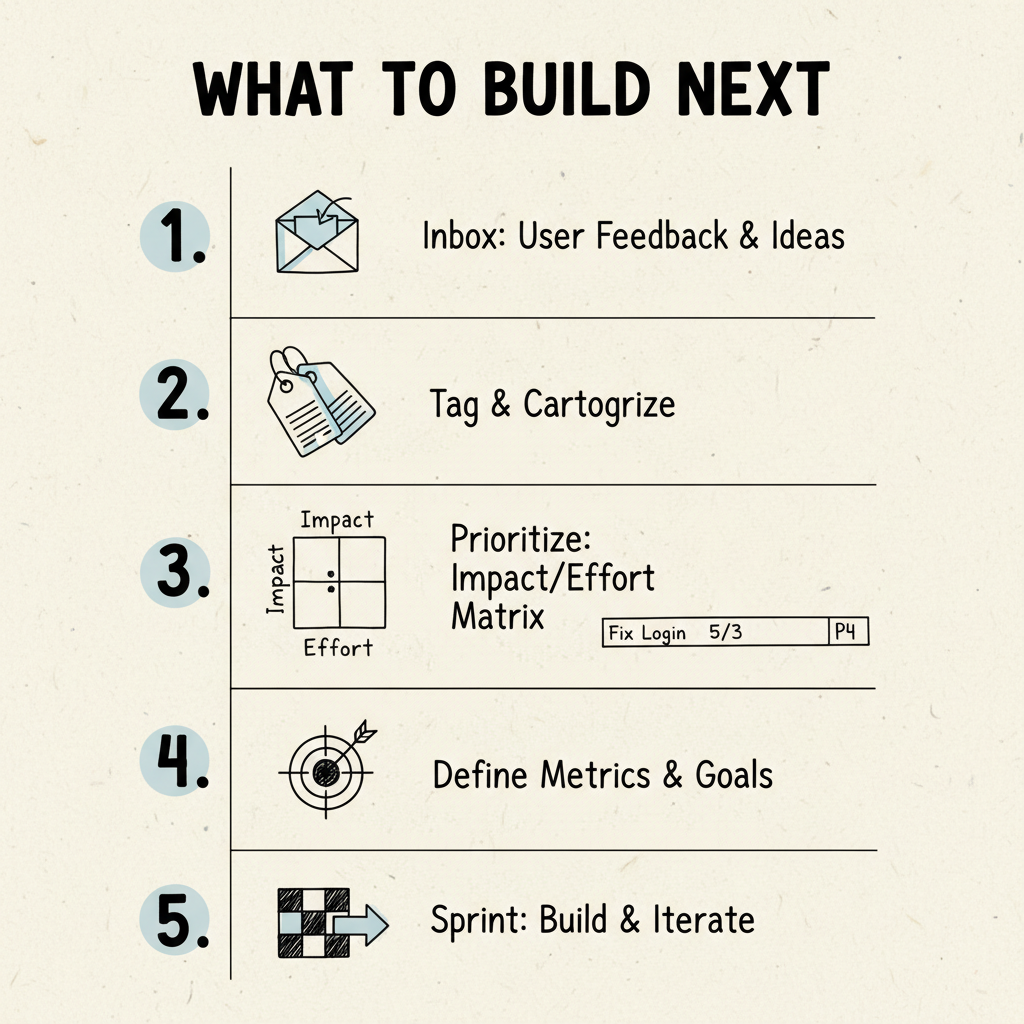
Introduction: The “Post‑Launch Fog”
You shipped. You got feedback. Now every user wants something different.
One says, “add teams.” Another says, “I need exports.” A third says, “Integrate with Slack.” Welcome to chaos.
Sprint 2 is when founders either scale or spiral. The trick is to move from random feedback to a focused roadmap you can ship in 14 days. This post gives you the 5‑step system I use with clients to plan Sprint 2 in a single afternoon - and a worksheet to copy.
Step 1 - Collect Every Single Request
Dump it all: tweets, emails, Loom DMs, demo notes, feature ideas, bugs. Don’t filter yet. Get it out of your head and into a list.
Why: a chaotic list is data; a chaotic mind isn’t. Once everything is concrete, you can structure it.
How to collect fast:
- Create one intake doc (Notion/Sheet).
- Paste raw quotes next to each item. Quotes beat summaries.
- Add “source” (user, channel) and date.
Sources to sweep today:
- Inbox and calendar notes from demos
- Support tickets and chat threads
- Social replies and community posts
- Analytics: search terms and failed actions
Don’t decide yet. Capture first.
Step 2 - Tag Every Item
Give each line a single tag. Options:
- Bug / Friction - something broken or confusing
- Quality‑of‑Life - small polish or workflow tweak
- New Feature - adds capability
- Request / Suggestion - idea without proof
This creates instant structure. When in doubt, tag by the most immediate blocker: if the user couldn’t complete the core job, it’s “Friction,” not “Feature.”
Tips:
- Keep tags mutually exclusive.
- Add a “Job‑to‑be‑Done” column to note which step of the core flow it touches.
- Mark “Quote strength” (1–3) for how concrete the user’s language was.
Step 3 - Score Impact vs Effort
Use a simple 1–5 scale; don’t overthink. Priority = Impact − Effort.
| Item | Impact | Effort | Priority |
|---|---|---|---|
| Export CSV | 4 | 2 | 2 ⭐ |
| Slack Integration | 5 | 4 | 1 ⭐ |
| Fix login delay | 5 | 1 | 4 ⭐ |
Guidance:
- Impact: does this help more users finish the core job faster or more often?
- Effort: honest size estimate in your stack (S/M/L ≈ 1/3/5 for this exercise).
Rules:
- High impact, low effort → do first.
- Bugs on the happy path outrank most features.
- Features that only help new personas belong later.
Step 4 - Map Feedback to the Core Metric
Your MVP was built for one job‑to‑be‑done and one success metric. Before adding anything new, ask:
“Does this help users succeed at that same job faster or more often?”
If not, it’s probably a distraction. Backlog it. Sprint 2 is for tightening the thin slice, not expanding the surface area.
Examples:
- Ticketing tool → core metric: tickets resolved. Slack notifications? Maybe. Comment threads that unblock resolution? Yes.
- Report generator → core metric: reports completed. PDF export? Often yes. “AI avatars”? Backlog.
Step 5 - Define Sprint 2 Scope (14 Days)
A good Sprint 2 is not “build everything.” It’s:
- 2–3 core improvements that directly raise completion or reduce time‑to‑first‑value
- 1 UX polish fix on the happy path
- 1 experiment tied to discovery or a new loop (e.g., Slack webhook)
Time‑box to 14 days again. Ship, learn, repeat.
Example for a ticketing MVP → Sprint 2:
- Add comment thread (core improvement)
- Fix image upload bug (polish)
- Experiment with Slack webhook (experiment)
Acceptance criteria (write these down):
- Comment thread: agents and requesters can add and view comments; email notifications optional
- Upload fix: images <5MB upload within 2s on median connection
- Slack: post “ticket resolved” to a channel via webhook with a deep link
Case Study - Transcript → Report MVP
Feedback after launch:
- “Can I upload Zoom files?”
- “Need PDF export.”
- “Add summaries per speaker.”
We scored them:
- Zoom upload (impact 5 / effort 2) → ✅
- PDF export (impact 3 / effort 2) → ✅
- Per‑speaker summaries (impact 4 / effort 5) → ❌ later
Sprint 2 shipped in 12 days. Result: +40% retention at Day‑30, fewer support tickets about data import, and 3 paid pilots extended.
Why it worked: the scope improved the core promise (“get a clean report fast”) and shortened the path to completion.
Turning Feedback into a Roadmap (Working Session Agenda)
Block 90 minutes with your team or builder. Use this exact flow:
- 10 min - Review the MVP promise, the thin slice, and the single success metric. Re‑decide if needed.
- 15 min - Brain dump all feedback and ideas into the intake doc. No debate.
- 15 min - Tag each item (Bug/Friction, QoL, Feature, Request). Note quotes.
- 20 min - Score Impact vs Effort. Do it fast; you can be roughly right.
- 10 min - Filter by alignment to the core metric.
- 10 min - Draft Sprint 2: 2–3 improvements + 1 polish + 1 experiment.
- 10 min - Write acceptance criteria and owners. Put dates on Day‑7 and Day‑14.
Outcomes:
- A one‑page Sprint 2 plan anyone can understand
- Clear owners for each item
- A Day‑14 demo outline
What Not to Do in Sprint 2
- Don’t expand to a new persona unless retention is already decent for Persona A.
- Don’t add settings. Add defaults.
- Don’t ship four experiments at once. One experiment, instrumented well.
- Don’t delay on bugs. A smooth happy path beats a “wow” feature users can’t reach.
Metrics to Watch in Sprint 2
If Sprint 1 focused on Completion and Conversion, Sprint 2 focuses on:
- Activation rate (sign‑ups who start the core flow)
- Completion rate (those who finish once started)
- Time‑to‑first‑value (TTFV)
- D7 retention for users who reached completion at least once
Add one Friday ritual: look at the biggest drop‑off and ship the smallest change that moves it next week.
Lightweight Tooling That Helps
- One sheet for feedback intake and scoring (Impact, Effort, Priority auto‑calc)
- One Kanban board with columns: Backlog → Ready → In Progress → In Review → Done
- One demo script for Day‑14 that mirrors the user’s journey (start → finish → result)
Make the tooling serve the sprint, not the other way around.
Common Founder Traps (and Fixes)
Trap: prioritizing the loudest voice.
Fix: prioritize by impact on the core metric.Trap: confusing novelty with value.
Fix: measure completion and time‑to‑first‑value, not feature counts.Trap: adding customization knobs.
Fix: pick sensible defaults; ship settings in Sprint 3+ if truly needed.Trap: working in the dark.
Fix: instrument the seven basic events and review weekly.
The Sprint 2 Worksheet (Lead Magnet)
I built a plug‑and‑play Notion/Sheet that includes:
- A feedback table with tags and quote strength
- Impact‑vs‑Effort auto‑calculation and sorting
- A visual roadmap template you can drag into your deck
👉 Download the Sprint 2 Road‑mapping Worksheet.
Key Takeaway
You don’t prioritize by opinion. You prioritize by impact, effort, and alignment to your core metric. Keep Sprint 2 thin: 2–3 improvements, 1 polish, 1 experiment - all in service of the same job‑to‑be‑done.
CTA
Grab the Sprint 2 Road‑mapping Worksheet and turn your MVP feedback into an actual plan.
Visit weekonelabs.com.
Building an MVP? Week One Labs ships custom-coded SaaS and mobile MVPs in fixed-price 14-day sprints. Book a free scope call to get a plan for your build.