MVP User Retention - Keep Early Users Engaged
Users left after day one? Your retention loops are broken, not your product. I show you how to keep users coming back.
Your MVP Isn’t Broken - Your Retention Is
Introduction: The “Day 2 Drop‑Off”
You launch.
People sign up.
You see a spike of traffic.
Then - silence.
This is where most founders panic and assume “product‑market fit is dead.” But most of the time, your value is fine. Your retention loop is missing.
Retention isn’t magic. It’s about helping users win again and again. Let’s build that system.
Why Retention Beats Growth
Growth gives you more sign‑ups. Retention gives you proof.
One returning user is worth ten new ones because they confirm the problem is real. If someone uses your MVP twice, they’ve found value once.
Rules of thumb:
- Don’t scale acquisition until completion and D7 retention are acceptable.
- Ship the smallest change that increases the odds of a second success.
The 3 Reasons Users Don’t Return
- They forgot you exist (no reminders).
- They hit a wall (no next step).
- They got value once, not repeatedly (no loop).
Your job: solve all three.
7 Simple Retention Loops for MVPs
These loops are deliberately small. You don’t need a “growth team.” You need clarity and a calendar.
- Next‑step nudges (right after success)
- After completion, show one, specific next action.
Example: “You generated a report - schedule weekly summaries?” - Put it on the success screen with a primary button. Cute banners don’t move behavior; buttons do.
- Progress tracking (progress bars, streaks, checklists)
- Make progress visible: “3/5 steps done,” “Streak: 2 weeks,” “On track for your weekly goal.”
- Use generous streaks (weekly is easier than daily). Avoid punishing resets in MVP stage.
- Usage reminders (value‑driven notifications)
- Send light, actionable reminders tied to user value: “Your tenant ticket is overdue,” “Two invoices un‑sent,” “3 buyers left items in cart.”
- Default to weekly cadence; turn off if D7 retention is already strong.
- Templates and shortcuts (speed to second success)
- Give users speed via templates, presets, and last‑used defaults. Familiarity builds habit.
- Offer a “repeat last action” button. Muscle memory is retention.
- Personal win recaps (weekly “you won” email)
- Recap what they achieved: “You saved 2.1 hours,” “5 issues resolved,” “$320 collected.”
- Add one targeted CTA: “Create your next task,” not five vague links.
- Social triggers (shareable milestones)
- Make wins shareable: badges, milestones, first 10 orders processed, first $100 collected.
- Give a one‑click share with pre‑filled copy. If even 5% share, referral rises and pride multiplies habit.
- Support loop (manual outreach to top users)
- Every Friday, message your top 10 active users: “Anything feel slow this week? One thing you wish worked better?”
- Manual support feels like product quality. It also catches friction you can fix Monday.
Stack 2–3 of these and you’ll see second‑session rates jump without any ad spend.
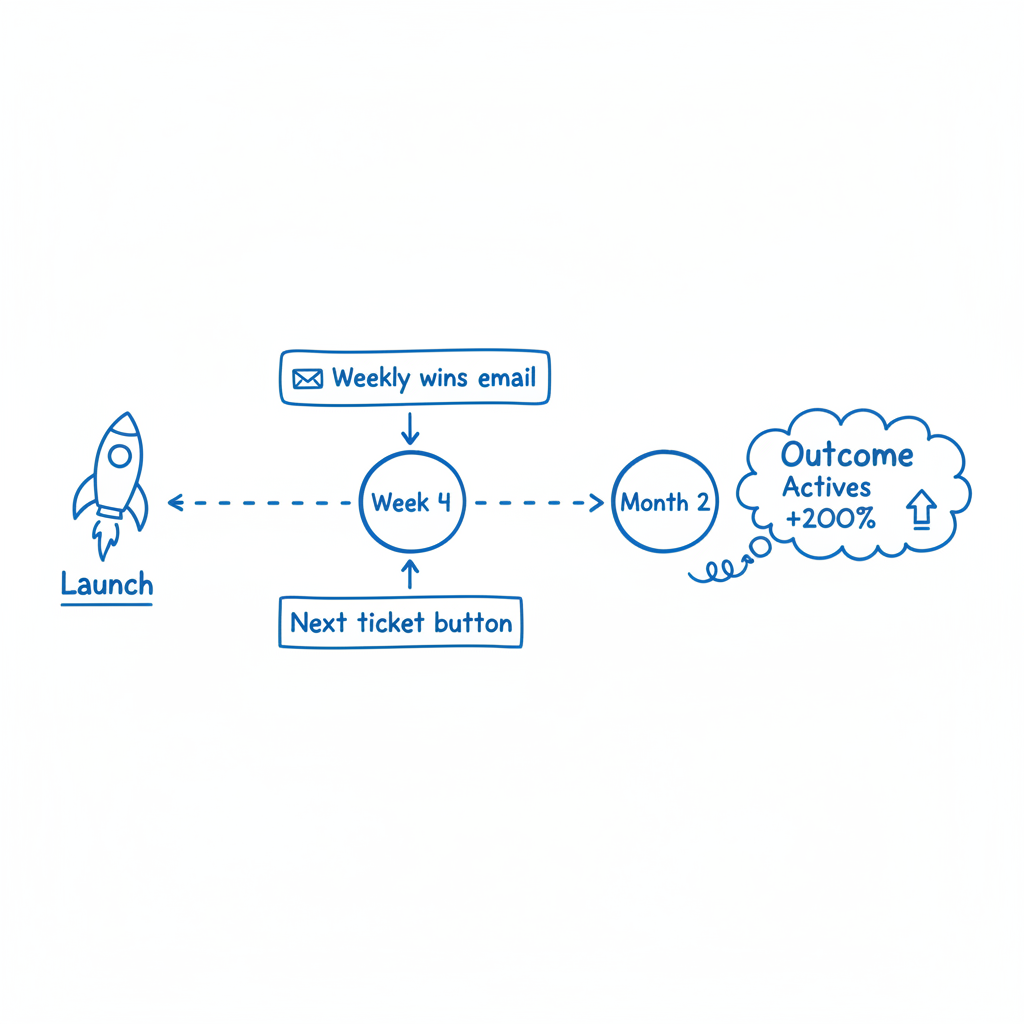
Example - Property Ops MVP
Month 1 metrics:
- 30 sign‑ups
- 10 active users week 1
- 2 after week 4
We added:
- A weekly recap email: “5 issues resolved this week”
- A “Create next ticket” CTA on the success screen
Month 2 = 6 active users (+200%).
Interpretation: value existed; the loop was missing. Nudges and next‑step clarity closed the gap.
How to Measure Retention (Without Fancy Tools)
First, define “active.” Keep it action‑based, not login‑based. Examples:
- Created ≥1 task in the last 7 days
- Uploaded ≥1 file in the last 7 days
- Generated ≥1 report in the last 7 days
Second, use weekly cohorts. For each week’s new users, measure what % return in week 2, week 3, week 4.
Targets (directional for early MVPs):
- Week‑4 retention: >20% for B2B; >30% for consumer
- If you’re at 5–10%, your loop is likely missing or your value is too episodic
How to set this up in a Sheet:
- Columns: week_start, new_users, active_wk1, active_wk2, active_wk3, active_wk4
- Formulas: wk2_ret = active_wk2 / new_users, etc.
- Update every Friday. Look for upward trends after you ship loops.
Retention as Learning (Not Just Numbers)
When people churn, ask why. Keep it one line:
“Hey - noticed you haven’t used X in a bit. Was it us or timing? One line reply is perfect.”
Patterns you’ll see:
- Timing: “Vacation,” “Quarter close,” “Hired a VA”
- Value gap: “First report was noisy,” “Template didn’t fit how we work”
- Friction: “Didn’t know the next step,” “Import failed”
Translate replies into Sprint 2:
- Fix friction on the happy path first (imports, edge cases, empty states)
- Add one template that matches the most common workflow
- Improve success screen → next step
Light‑Weight Lifecycle Map (What to Send and When)
You can run a credible retention program with three messages and two screens.
Messages:
- Welcome (immediately after sign‑up)
- “Here’s the one thing to do in the next 60 seconds.”
- Link to a 60‑second Loom showing the happy path.
- Success recap (immediately after completion)
- “You did it. Here’s the result.”
- One next‑step CTA.
- Weekly win recap (once a week)
- “Here’s what you achieved (X saved / Y completed).”
- One CTA to repeat the core action.
Screens:
- Success screen with a clear next step
- Progress dashboard with a simple goal or streak
That’s enough to move D7 and D30 without complexity.
Choosing the Right Loop for Your Product
Map your job‑to‑be‑done to the loop type:
- Episodic jobs (monthly invoices, weekly reports): progress tracking + weekly recap + scheduled tasks
- Ongoing workflows (tickets, operations): usage reminders + next‑step nudges + support loop
- Collaborative tools: social triggers + shared goals + invite prompts at completion
If you’re unsure, start with “success recap → next step” and a weekly win recap. Those two cover most products.
Instrumentation: The Two Events That Matter Most
You can get fancy later. For retention, prioritize:
completed_core_flow(what counts as a “win”)repeated_core_flow(the same user did it again within 7 or 30 days)
Everything else is supporting detail. If completed_core_flow is zero, fix activation. If repeated_core_flow is low, ship loops.
Common Mistakes (And Easy Fixes)
Mistake: treating login as retention.
Fix: measure active behavior only.Mistake: sending generic newsletters.
Fix: send personal win recaps tied to their data.Mistake: adding three features to “increase value.”
Fix: remove friction from the one job; add a template.Mistake: burying the next step.
Fix: success screen with one big button to do it again.
The Retention Playbook (Lead Magnet)
I put together a one‑page playbook with:
- 7 loops + concrete examples you can ship in a day
- A retention cohort template (Notion/Sheet)
- A sample “weekly win recap” email
👉 Download the Retention Playbook.
Key Takeaway
You don’t fix retention by adding features. You fix it by helping users succeed again. Make the next step obvious, celebrate wins, and follow up with value.
Ship two loops this week. Then check D7. You’ll know.
CTA
Grab the Retention Playbook and let’s turn your MVP into a habit‑forming product.
Visit weekonelabs.com.
Building an MVP? Week One Labs ships custom-coded SaaS and mobile MVPs in fixed-price 14-day sprints. Book a free scope call to get a plan for your build.